Overview
According to McKinsey, the average knowledge worker spends 9.3 hours a week searching for information. In most organizations, the knowledge management tool they bought to fix that is part of the problem.
Knowledge management tools are software platforms designed to capture, organize, and share institutional knowledge so employees can find the right answer, fast. That's the promise. The reality is that most of them fail—not because the technology is broken, but because they're deployed like filing cabinets and expected to behave like search engines. Within 18 months, the average knowledge management platform becomes another digital junk drawer: outdated pages, broken search, zero adoption. The 2026 generation of KM software works differently. This guide covers what modern knowledge management tools actually do, the main categories to know, a side-by-side comparison of today's top platforms, and how to pick one your team will actually use.
What is knowledge management software?
Knowledge management (KM) software is a category of platforms that help organizations capture, organize, retrieve, and maintain institutional knowledge — the documents, answers, processes, and expertise that otherwise live scattered across tools and people's heads. It's the infrastructure behind a working single source of truth.
Knowledge management vs. knowledge management software
Knowledge management is the practice. Knowledge management software is the platform that makes the practice possible.
The distinction matters because a lot of KM initiatives fail at the practice level—unclear ownership, no content health process, no incentive for experts to contribute—and then blame the software. Better software helps. It doesn't substitute for knowing why you're doing this.
What modern KM software actually does
Modern knowledge management software handles five core jobs:
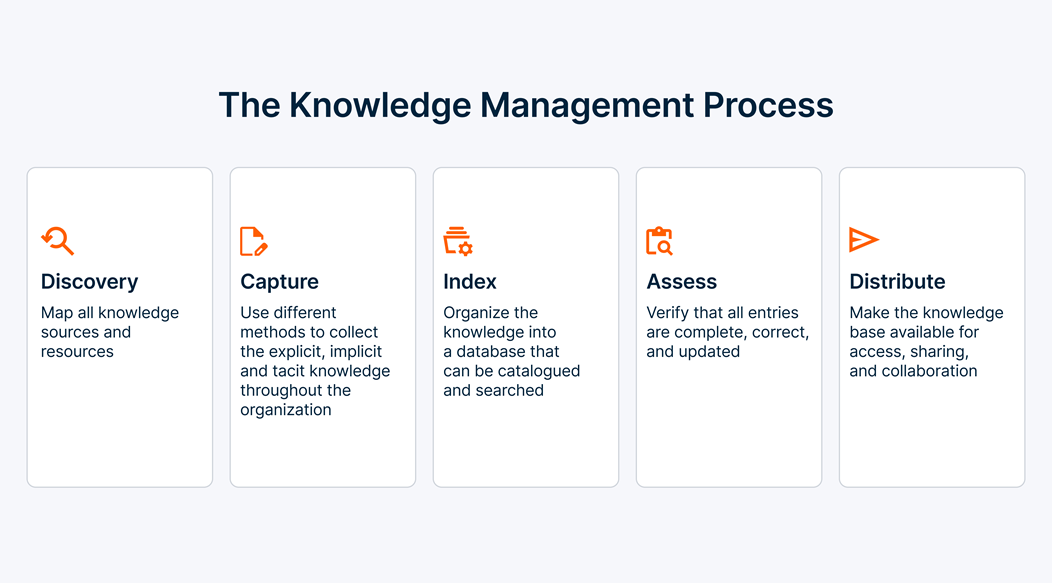
- Capture: Converts scattered information—docs, tickets, chats, recordings—into structured, reusable knowledge
- Organize: Applies taxonomy, tags, permissions, and content ownership so knowledge is navigable at scale
- Retrieve: Surfaces the right answer to the right person through search, AI, and in-workflow delivery (Slack, Teams, browser)
- Distribute: Pushes knowledge into the tools people already work in rather than forcing a context switch
- Verify: Flags stale content, routes it to owners for review, and keeps the library trusted over time
The last job—verification—is the one most legacy tools skip, and it's why most knowledge bases rot.
How the category has shifted
Five years ago, "knowledge management software" meant a wiki. You wrote pages. People searched by keyword. Results were bad. You gave up.
Today's leading knowledge management platforms are built around AI-powered semantic search, in-workflow delivery, and automated content health. They answer questions in natural language, surface knowledge inside Slack and browser tabs without making users switch apps, and flag outdated content before it misleads anyone. The shift is less about features and more about where knowledge lives—no longer in a separate destination but embedded in the flow of work.
That shift is also why "knowledge base" is only one piece of a modern stack. A working KM strategy now almost always combines a knowledge base with an AI layer that connects it to the rest of your systems.
Types of knowledge management tools
Most guides list five categories. The honest answer is six—the sixth is the one that matters most in 2026.
Knowledge bases
Self-service libraries of articles, FAQs, how-to guides, and product documentation. Internal knowledge bases serve employees; external ones serve customers. Both live or die by search quality. Examples: Document360, Zendesk Guide, HubSpot Knowledge Base, Helpjuice.
Internal wikis and collaboration platforms
Team-authored documentation and collaboration spaces. Pages, nested hierarchies, inline comments, version history. Stronger on authoring than on retrieval. Examples: Confluence, Notion, Slite, Nuclino.
Document management systems (DMS)
Versioned file storage with access controls, collaboration, and compliance workflows. Not purpose-built for knowledge retrieval, but often the de facto system of record for policies, contracts, and formal documentation. Examples: SharePoint, Google Drive, Box.
Learning management systems (LMS)
Training content, courses, quizzes, and skills tracking. Adjacent to KM rather than core—but important when onboarding, compliance training, or certifications are part of the knowledge stack. Examples: iSpring Learn, Docebo, Absorb LMS.
 Source: https://www.tettra.com/article/knowledge-management-process-101
Customer relationship management (CRM) with knowledge features
CRM platforms increasingly include knowledge capabilities aimed at customer-facing teams. Context about accounts, past interactions, and product usage lives alongside articles and playbooks. Examples: Salesforce Knowledge, HubSpot Service Hub.
AI enterprise search and knowledge overlays
The emerging sixth category — and the one reshaping the market. These tools don't replace your existing knowledge stack. They sit on top of it, ingest content from every source (wiki, tickets, docs, chat), and use LLMs and semantic search to deliver answers in the tools people already use. Examples: Guru, Glean, eesel AI, Read AI.
Top knowledge management tools
Ten platforms worth knowing in 2026, ordered by category so you can jump to the shortlist relevant to your situation. None of these is "the best" in isolation—fit depends on what you're solving for.
Guru (AI-driven)
AI knowledge platform that unifies information from Slack, Teams, Google Workspace, Salesforce, and other systems into a permission-aware knowledge layer. Strongest for internal-facing teams that want verified answers delivered in-workflow via browser extension and Slack. Built-in verification nags content owners to keep cards fresh. Best for: mid-to-large teams with sprawling tool stacks and a dedicated knowledge owner.
Confluence (general/wiki)
Atlassian's mature team wiki, deeply integrated with Jira. Structured pages, templates, spaces, and an active marketplace of apps. The default choice for engineering and product orgs already in the Atlassian ecosystem. Strong at formal documentation; less strong at surfacing knowledge outside the app. Best for: engineering, product, and technical teams with existing Atlassian investment.
Notion (all-in-one)
Flexible workspace combining docs, databases, tasks, and wikis. Highly customizable, fast to adopt, less opinionated about structure. Enterprise search with AI now searches across connected sources (Slack, Drive, GitHub). Scalability is the trade-off: what feels frictionless for 20 people can feel chaotic at 2,000. Best for: small and growing teams that want flexibility over rigid structure.
Document360 (technical docs)
Purpose-built for product and API documentation. Markdown and WYSIWYG editing, strong version control, category management, and AI search. Popular with SaaS companies for public help centers and developer portals. Support-ticket deflection features are mature. Best for: technical writers, product teams, and SaaS companies that prioritize external documentation quality.
Zendesk Guide (customer service)
Help-center knowledge base tightly integrated with Zendesk's ticketing. Multilingual, AI-assisted authoring, deep analytics on article performance and deflection. Strongest inside a Zendesk stack; less compelling as a standalone. Best for: support organizations at scale, particularly those already on Zendesk.
Bloomfire (AI-driven enterprise)
Enterprise knowledge management with AI-powered search, natural-language Q&A, automated tagging, and content health analytics. Strong on handling mixed content types—video, audio, PDFs—with deep indexing and transcript search. Best for: mid-to-large enterprises with heavy multimedia knowledge and a need for AI-readiness across content.
Slite (AI-powered wiki)
Lightweight wiki with strong AI search ("Ask Slite") and a focus on making documentation easy to find and keep current. Integrates with Slack, Google Workspace, and other team tools. Best for: growing teams that need a focused knowledge base without the complexity of Confluence or the sprawl of Notion.
Glean (AI enterprise search overlay)
AI-powered enterprise search that connects to existing tools — Drive, Slack, Jira, Salesforce, GitHub, Confluence — and answers natural-language questions across all of them. Permission-aware by design. Doesn't replace your knowledge stack; makes it findable. Best for: enterprises with sprawling toolchains and no appetite for content migration.
HubSpot Knowledge Base (integrated CRM)
Knowledge base bundled into HubSpot's Service Hub. Free tier available. Tight integration with HubSpot CRM, CMS, and marketing tools. Best when HubSpot is already the center of gravity. Best for: HubSpot-native companies that want customer-facing knowledge without adding another vendor.
BookStack / Wiki.js (open source)
Self-hosted, open-source knowledge base platforms. Free, customizable, and fully under your control—which is either the selling point or the problem, depending on your infra resources. Best for: teams with data-residency constraints, security-sensitive deployments, or strong internal engineering.
How to choose knowledge management software
The knowledge management software market is noisier than it's ever been. Every vendor claims AI. Every vendor claims enterprise-ready. Most of them aren't wrong—but the dimensions that actually separate them show up in the fine print, not the marketing.
5 questions to ask before you shortlist
Before you start comparing tools, answer these internally. The answers narrow the field faster than any feature matrix:
- Who is the audience — internal teams, customers, or both? Internal-first tools optimize for authoring and verification. Customer-facing tools optimize for SEO, deflection, and localization. Trying to do both with one tool usually means doing neither well.
- What's the search method — keyword, semantic, or LLM-based? Keyword search in 2026 is a ceiling. Semantic search understands intent. LLM-powered search generates answers with citations. The gap between them is the difference between "find the doc" and "get the answer."
- How does the tool handle permissions at scale? Permission-awareness isn't just security—it's the reason AI search either works or leaks. If your RAG layer surfaces what it shouldn't, that's a permissions problem, not an AI problem.
- What's the content-health story — who keeps it current? Ask every vendor: how does your platform detect stale content, assign it to an owner, and flag it for review? If the answer is "the admin dashboard shows you a list," that's not automation. That's homework.
- What's the true TCO — including admin overhead? Licensing is rarely the biggest cost. Admin time, content-migration effort, and ongoing curation frequently dwarf it. Ask for a reference customer's first-year total cost, not the per-seat sticker.
Decision framework: which category fits your situation
Most buyers waste weeks comparing tools that aren't in the same category. Start with the category first, then shortlist within it:
- Choose an AI enterprise search overlay (Guru, Glean) when knowledge lives across many existing tools and migration isn't feasible. You're solving a findability problem, not an authoring one.
- Choose a dedicated wiki or knowledge platform (Confluence, Notion, Slite, Bloomfire) when you need a structured single source of truth and you're willing to invest in authoring and curation. You're solving a content-creation and governance problem.
- Choose a customer-facing knowledge base (Document360, Zendesk Guide, HubSpot) when deflection, self-service, and external user experience are the primary goals. You're solving a support-scale problem.
The mistake is picking from the wrong category first and then wondering why the tool doesn't solve the problem.
How can I ensure data security in knowledge management software?
A knowledge management platform concentrates an organization's most sensitive content—customer data, internal strategy, employee records, IP. Which makes security not a feature, but the floor. Five areas deserve explicit scrutiny before you buy.
Access controls and permission models
Role-based access is table stakes. Group inheritance, per-document overrides, and tenant-level isolation separate enterprise-ready platforms from small-team tools. The more critical question in 2026: does the AI layer respect the same permissions as the underlying content? Naive retrieval-augmented generation frequently leaks content users aren't supposed to see—a failure that isn't obvious until it happens.
Authentication and provisioning
Expect SSO via SAML or OIDC, SCIM for automated user provisioning and deprovisioning, and MFA as a baseline. SCIM matters more than most buyers realize: manual offboarding is how former employees retain access to your wiki for years.
Encryption and key management
AES-256 at rest and TLS 1.3 in transit are the defaults. For regulated industries, look for customer-managed keys (BYOK) and hardware security module (HSM) support. Default encryption isn't the same as defensible encryption.
Audit logging and compliance certifications
Comprehensive audit logs—who viewed, edited, exported, or shared what, and when—are the foundation of any post-incident investigation. Compliance certifications to ask about: SOC 2 Type II (minimum), ISO 27001, HIPAA (if handling health data), GDPR (for EU data), and FedRAMP (for US government work). Certifications aren't interchangeable; each covers a specific set of controls.
Data residency and AI data handling
Two questions to get in writing:
- Where is our data physically stored, and can we choose the region? This matters for EU, APAC, and government buyers, and increasingly for any company with cross-border obligations.
- Is our content used to train the vendor's models, or third-party LLMs they integrate with? Defaults vary. Some vendors opt you in unless you opt out. Others route queries through third-party models (OpenAI, Anthropic) with their own retention policies. Ask for a written data-flow diagram, not a marketing answer.
Best practices for migrating data to a new knowledge management system
Most KM migrations fail quietly. Content moves. People don't. A few weeks in, users realize the new platform is just as hard to search as the old one—because the same messy content came with it.
Step 1—Audit current content
Before you migrate anything, inventory what you have. Who owns it, when it was last updated, how often it's accessed. The typical finding: 30% to 40% of content hasn't been touched in over a year, and a meaningful share is outright duplicate. You can't fix what you don't measure.
 Source: https://www.tettra.com/article/knowledge-management-process-101
Step 2—Define the new taxonomy before you migrate
Category structure, tag vocabulary, permission groups, content-ownership model. Get this right on paper first. Migrating messy structure into a new tool just moves the problem and adds a bill.
Step 3—Clean and deduplicate
Archive the stale. Merge the duplicates. Delete the obsolete. This is the step that separates migrations that succeed from the ones that become cautionary tales. Most teams cut content volume 40% to 60% at this stage — and it's the single highest-leverage activity in the entire project.
Step 4—Run a pilot migration
Pick one team and one content type. Migrate, validate search behavior, test permissions, check formatting. Resolve the issues on a small footprint before you cut over the company.
Step 5—Validate permissions post-migration
Permission drift is the single largest security risk in KM migrations. Validate, before users log in, that people see only what they should see. Don't rely on the old system's settings to translate cleanly—they rarely do.
Step 6—Phased cutover with parallel access
Keep the legacy system read-only for 30 to 60 days. Let power users surface gaps. Forced hard cutovers generate backlash and undermine adoption. A quiet, phased cutover is almost always cheaper than a clean one.
How do I measure the ROI of a knowledge management system?
Every KM vendor has a slide deck about time saved. Very few buyers can show, post-deployment, what the platform actually returned. The fix is agreeing on the measurement before you deploy—not after.
A simple ROI formula you can plug into
The calculation most buyers should start with:
Hours saved per employee per week × hourly cost × team size × 50 weeks) − (platform cost + admin cost) = annual ROI
Worked example: A company of 100 knowledge workers saves three hours per employee per week through better search and in-workflow delivery. At a fully loaded hourly cost of $75, that's:
3 × $75 × 100 × 50 = $1.125M in recovered productivity
Less platform cost (~$30K/year) and admin cost (~$60K/year)
Net ≈ $1M annual ROI in year one
The formula isn't meant to be precise. It's meant to keep the conversation honest. If a vendor's pricing can't be justified inside a back-of-napkin like this, it's not going to be justified later.
Knowledge management, AI, and the enterprise foundation
One closing thought worth making explicit: knowledge management software is no longer a standalone purchase. It's becoming the context layer for enterprise AI.
Every AI agent, copilot, and autonomous workflow an organization deploys is only as good as the knowledge it draws on. Intelligence without context hallucinates.
Context without governance leaks. The organizations that will get the most out of AI in the next three years are the ones treating their knowledge infrastructure as the foundation, not an afterthought—grounding AI in trusted, governed, permission-aware content rather than hoping the model figures it out.
That's the shift behind everything in this guide. The right knowledge management tools aren't just search boxes. They're the substrate enterprise AI runs on.
Learn how Teradata’s Autonomous Knowledge Platform grounds enterprise AI in trusted data.
Frequently asked questions on knowledge management tools
Still have questions about knowledge management tools? Here are answers to some of the most common.
What are the tools of knowledge management?
What are the tools of knowledge management?
Knowledge management tools fall into six main categories: knowledge bases (self-service libraries for employees or customers), internal wikis and collaboration platforms (like Confluence and Notion), document management systems (SharePoint, Google Drive), learning management systems (iSpring, Docebo), CRM platforms with embedded knowledge features (Salesforce, HubSpot), and AI enterprise search and knowledge overlays (Guru, Glean). Most organizations end up combining two or three of these rather than relying on a single tool.
What are the 7 types of knowledge management?
What are the 7 types of knowledge management?
Some frameworks list seven types by separating internal and external knowledge bases, distinguishing structured from unstructured documentation, or breaking out AI-powered search into its own category. In practice, the useful distinction is between tacit knowledge (what people know and haven't written down) and explicit knowledge (what's documented). Good KM tools help convert tacit knowledge into explicit knowledge — usually by making capture and verification easier than the status quo.
What are the 5 C's of knowledge management?
What are the 5 C's of knowledge management?
The 5 C's are Capture, Curate, Connect, Collaborate, and Contribute. Capture covers turning conversations, tickets, and tribal knowledge into documented content. Curate is keeping it organized, tagged, and current. Connect is linking related knowledge across tools and teams. Collaborate is enabling co-authoring and feedback. Contribute is making it easy for experts to add knowledge without friction. Weakness in any one undermines the others.
What is the difference between a knowledge management platform and a knowledge base?
What is the difference between a knowledge management platform and a knowledge base?
A knowledge base is a library—a structured repository of articles and documents. A knowledge management platform is the full system that includes a knowledge base plus authoring tools, search, permissions, analytics, content-health automation, and integrations. Every knowledge management platform contains a knowledge base. Not every knowledge base is a full platform.
Are AI knowledge management tools actually better?
Are AI knowledge management tools actually better?
For search and retrieval, yes—substantially. Semantic and LLM-powered search outperforms keyword search on almost every benchmark, and generative answers with citations save real time. The caveats: AI amplifies both the strengths and weaknesses of the underlying content. If the content is outdated or incomplete, AI will confidently serve bad answers. If permissions aren't correctly mapped, AI will surface content it shouldn't. The right AI knowledge management tools solve for this. The wrong ones accelerate existing problems.
How much does knowledge management software cost?
How much does knowledge management software cost?
Open-source options (BookStack, Wiki.js) are free but carry infrastructure and maintenance costs. Commercial tools typically range from $4–$15 per user per month at the low end (Slite, Notion, Tettra) up to $50+ per user per month for enterprise-grade platforms with AI capabilities and advanced governance (Guru, Glean, Bloomfire). True cost almost always exceeds licensing once admin time, migration effort, and ongoing content curation are included.
How long does a KM implementation take?
How long does a KM implementation take?
A simple small-team deployment can be productive within 2 to 4 weeks. A mid-market rollout with content migration and integrations typically takes 2 to 3 months. An enterprise deployment with permission mapping, migration from legacy systems, and formal governance processes runs 3 to 6 months minimum. The variable that most affects the timeline isn't the software—it's content cleanup.
What's the best knowledge management software for small business?
What's the best knowledge management software for small business?
For teams under 50 people, the best knowledge management software is usually the lightest one that covers the use case. Notion and Slite offer strong free or low-cost tiers with fast adoption. HubSpot's Service Hub includes a free knowledge base if the team already uses HubSpot CRM. For open-source-comfortable teams, BookStack is a credible self-hosted option. Enterprise-grade tools (Guru, Glean, Confluence) typically become worthwhile above 50–100 users, or earlier if security and compliance are priorities.